
Registration Updated
Registration now happens online at register.writewithjanet.com — no more paper or Google Forms. The short version:
- Browse the schedule for the current session, then register each student — parent info, child info, and your day/time preferences, all on one form. Please give the name of your child's school (not the district).
- You'll get a confirmation email right away, with a link back to your registration. No password to remember — the system emails you a secure sign-in link whenever you need to get back in.
- Placement is still personal. First come is not first served: Janet waits until enough students register to build compatible groups, then confirms your child's placement by email. She'll tell you when to expect your schedule.
- If your student has an IEP or 504 plan, send it along when you register — see IEP/504 below.
Putting a schedule together
Once a session is announced, Janet gathers registrations for a while before building groups — school-year schedules are particularly complicated with everyone's after-school activities. Groups need students at reasonably compatible writing levels, so patience here is what makes the classes good.
In summer, 2nd and 3rd grade groups always meet at 8:30 AM — younger kids are too tired to stay focused after camps later in the day.
Group size
- Small groups run from 3 to 5 students depending on enrollment and age; up to 6–7 is possible with older students.
- 2nd–3rd grade groups are limited to 4.
- A small group needs a minimum of two students. If no other student registers and the class is cancelled, anything you have paid is refunded in full.
Materials for class
Janet provides all writing materials for grades 2–3. Students in 4th grade and up need to bring a laptop with a keyboard and charger — not an iPad — and must be able to:
- Log into their computer
- Log into a personal Gmail account (not their school account)
- Log into Google Docs
Please make sure parental-control time limits won't interrupt your child during class, and email Janet before class if your child will be late.
How to share a Google Doc with Janet
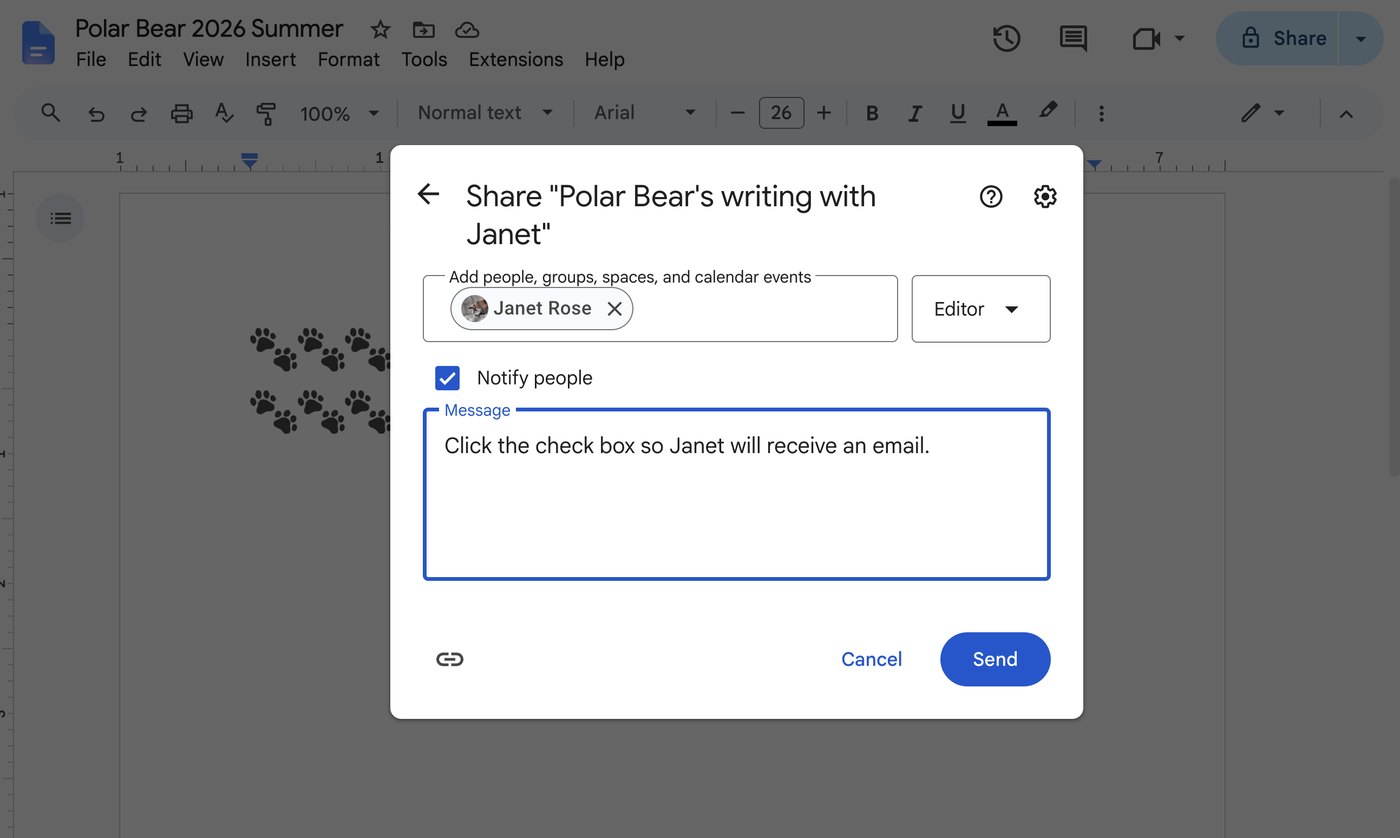
Students write in Google Docs and share their work with Janet so she can read it and leave feedback between classes. It's a one-time setup per document.
- Open the document and click Share, at the top right.
- Type Janet's email address into Add people, then pick her from the list.
- Leave the permission set to Editor — Janet writes her feedback directly into the document.
- Tick Notify people. This is the step families most often miss: without it Janet never finds out the document exists.
- Click Send.
Payments & refunds Updated
- Full payment is due when Janet confirms your placement, by Zelle (preferred) or check.
- Zelle payments go to janet@writewithjanet.com — not Janet's personal email or cell number.
- In the Zelle "reason" field, include your student's name (e.g. Good Student). The new system matches payments to your family automatically when it can — a clear memo is what makes that work. Don't include other info.
- Paying in parts is fine — your account keeps a running balance of what's been charged and what's been received, and the system sends a reminder if a balance is still open. No need to email to confirm your payment.
- There is no deposit — nothing is due until your placement is confirmed.
Cancellations & make-ups
- There are no make-up lessons, and no pro-rating or refunds for times a family can't make.
- During the school year, your student may attend another class that week as a make-up, where one exists.
- In summer there are no make-ups — classes run back-to-back for one to two weeks, and sessions end when they end.
Holidays Updated
Sessions are planned so that there are simply no classes the week of a school holiday. No polling, no guessing — holiday weeks are off.
The dogs New
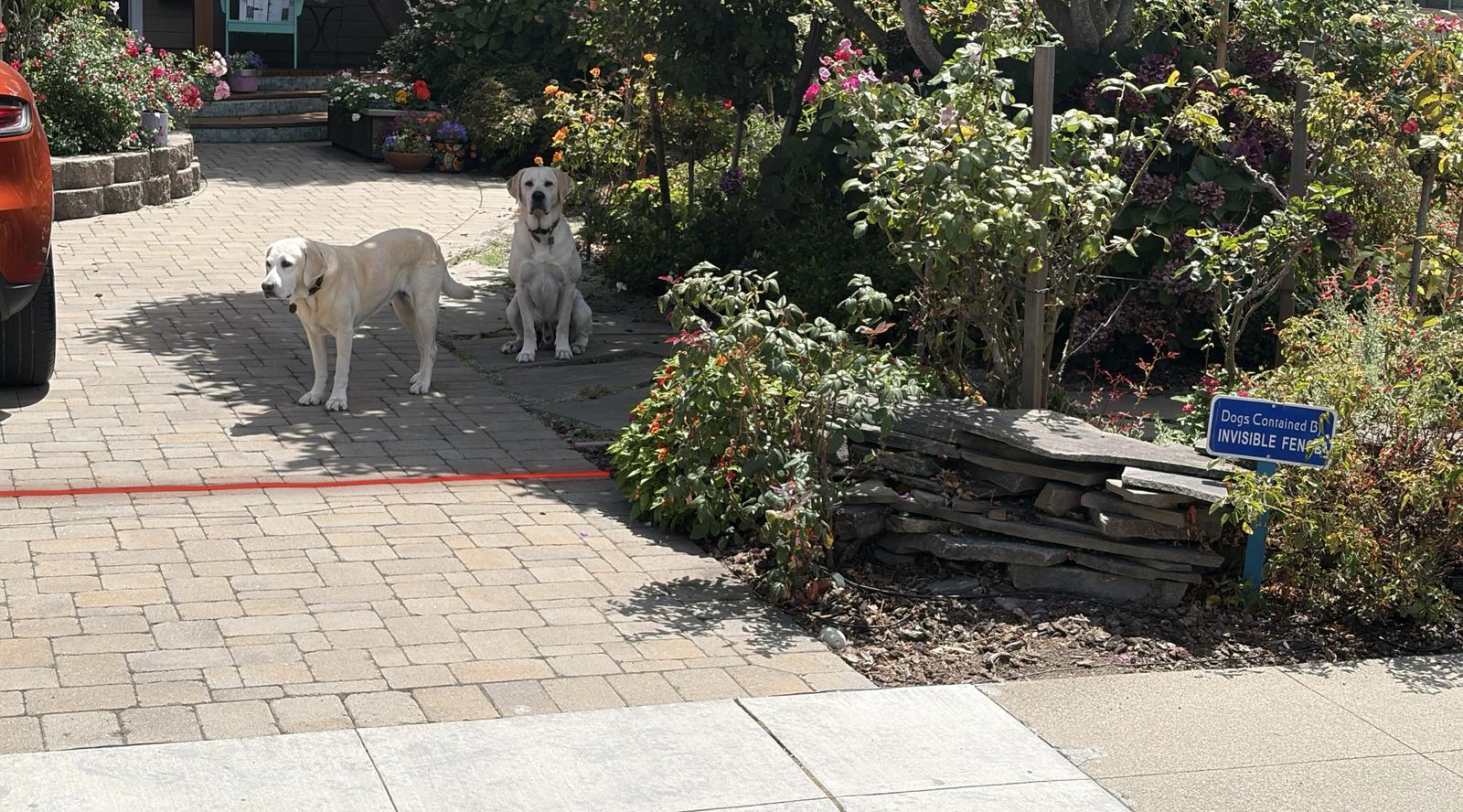
- Three labs are part of the household — for most students they're the best part of class.
- If your child is nervous around dogs, mention it when you register. Janet manages the introductions, and the dogs are happy to keep their distance while a student warms up.
- If you'd rather not meet the dogs yourself — some families love them, some prefer to keep a distance, and both are welcome here — you can drop off and pick up from behind the red line on the driveway. The dogs are contained by an invisible fence (there's a sign at the driveway) and stay on their side of the line.
- Allergies: the dogs live here, so the home isn't allergen-free. Mention a dog allergy when registering and Janet will talk through options with you.
No Zoom classes
Janet is not a believer in Zoom for learning writing. Kids need a comfortable atmosphere and a relationship with the teacher, neither of which really happens on a screen — and feedback is hard when most children under 5th grade aren't yet quick on computers. The exception: middle schoolers Janet has already worked with.
FSA receipts Updated
The new registration system generates FSA receipts. Sign into your account at register.writewithjanet.com and download a receipt covering the sessions your student attended — no need to request one by email.
IEP / 504 & special needs
- If your child has an IEP or 504 plan, please send Janet a copy when you register. She'll contact you to discuss your child's needs before placement.
- Private lessons are reserved for very reluctant writers and children with dyslexia and other learning differences.
- If you need Janet to fill out assessment forms for your student's special needs, there's a charge of $55 per form — they take significant time.
Struggling in school beyond writing class? Janet also works with families as a child advocate.
Grades taught
Grades two through eight. First graders don't yet have the attention span and social skills to write in a group setting.